|
|
|
 |
 News
Support
Dealers
Company
Contact
Deutsch
News
Support
Dealers
Company
Contact
Deutsch
|
Clipboard
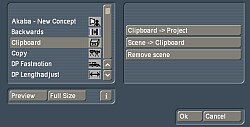
Begin by selecting the scene you want to copy in the scene bin. In the "Edit" menu, click on "Special" and then "Clipboard". With the "Scene->Clipboard" command, you can then copy the scene in question to a temporary clipboard (like in computer operating systems). Under "Project Settings", switch to the project into which you wish to copy the scene. In the "Edit" menu, select "Special" and then "Clipboard", and click on the "Clipboard->Project" command. If you have copied more than one scene to the clipboard, you can now choose which scene is to be copied into the project.
Once you confirm by pressing "OK", the copied scene will be listed in the Scene Archive, making a lasting copy of the data within the project. The clipboard itself is deleted when the device is switched off. The only condition for using the clipboard is that the project settings for the source and target projects match (image and sound quality, ...).
|
|
|