Products     News     Support     Dealers     Company     Contact               Deutsch
Technical support     FAQ     Tips     Workshops     Cooperation     Downloads    


DVD-Arabesk 1 FAQ

Question: Can I add additional titles to a DVD that has already got data recorded on it?
Answer: After data is written to a DVD, it is "completed/closed" so that further titles cannot be added (multi-session). The data on a DVD-RW, however, can be completely wiped. This allows you to "add" further titles in the Arabesk program component so that you can burn them together with the titles that you previously "added" in the Arabesk program component.

Q: How many films can I burn onto a DVD?
A: You can use DVD-Arabesk to burn up to six film titles onto a DVD – each of these can in turn comprise up to 99 chapters/skip marks.

Q: Is it also possible to copy DVDs?
A: Any DVDs that you created yourself using DVD-Arabesk as well as other non-copy protected DVDs can be read by DVD-Arabesk and copied to other DVDs as often as you like without any loss in quality.

Q: Which DVD formats are supported by DVD-Arabesk?
A: You can use DVD-Arabesk to burn DVD-Rs – which can only be recorded once – and to burn DVD-RWs, which can be re-recorded up to 1,000 times. These formats offer the highest possible compatibility with consumer DVD players available on the market.

Q: How can I create chapters/skip marks on a DVD?
A: You can define up to 99 chapters/skip marks for each film. You can then directly "skip" to these chapters using the chapter buttons on the DVD player's remote control.
You can define each storyboard scene as the beginning of a chapter in the DVD-Arabesk menu – though this, of course, generally does not make much sense if you are using film scenes that have a typical length of only 3 to 5 seconds. You can use this feature, for instance, to define each day of your vacation as the start of a chapter in your vacation video.

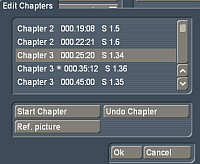
The "Edit Chapters" window contains the storyboard with a list of all the scene names. This is where you can define as many of the scenes as you like as the start of a new chapter ("Start Chapter" button).


Last update:
26.06.2007
© 2002 MacroSystem
Imprint